
Research integrity
QC by Galleys
Screen every manuscript before peer review. Nine engines check ethics, duplicates, structure, references, proofreading, AI signals, journal fit, and indexing metadata — a full pass in three to five minutes, on a platform kept separate from your journal site.
Sample screening summary — one manuscript, six of nine engines
Actual run on qc.galleys.pub. Full reports cover all nine engines in a three-to-five-minute pass. 5,000+ articles screened to date.
Why QC by Galleys
Why manual manuscript checks are quietly draining your editorial team
Right now, before any manuscript is ready to publish, someone on your team has to check it by hand: verify every reference, confirm author and affiliation details, compare the numbers in the abstract against the tables, and re-read dense statistics for mistakes a spell-checker would never catch. That’s hours per manuscript, every week, for every journal you run.
QC by Galleys does this same work automatically in 3–5 minutes — cross-checking every reference against the real Crossref database, reading the paper for meaning, and flagging exactly what a careful human reviewer would flag.
That makes it useful well beyond the editor’s desk: copy editors and proofreaders get a clean punch-list instead of a blank re-read, managing editors get an instant triage signal on every submission, and peer reviewers start from a manuscript already checked for mechanical errors.
Cleaner citations, consistent data, and fewer overlooked errors also strengthen your journal’s case for indexing — helping it qualify for and stay listed in:
- Web of Science
- Scopus
- PubMed
- zbMATH
- and other major databases
Copy editors & proofreaders
A clear punch-list of issues instead of starting every manuscript from a blank re-read.
Managing editors
An instant triage signal on every submission — spot mechanical failures before they reach peer review.
Peer reviewers
Start from a manuscript already checked for references, numbers, and other mechanical errors.
Built to support recognised indexing standards
QC does not guarantee listing — no tool can. It improves the article quality indexers assess when they review your journal.






Logos represent indexing services whose quality criteria inform our check library. Galleys.pub is not affiliated with or endorsed by these organisations.
Nine QC engines
Every plan includes all nine engines
Each run produces a structured screening summary and an exportable PDF report.
Ethics screening
Authorship anomalies, consent gaps, fabrication signals and COPE-aligned risk flags.
Duplicate submission
Title, abstract and full-text matching against your archive and external sources.
Math verification
Equation notation, labels, delimiters and computational consistency.
Citation integrity
Broken DOIs, orphan cites, retracted references and style compliance.
AI-Content Detection
Probability scoring calibrated on academic writing rather than general web text.
Journal fit scoring
Semantic scope match against your published corpus, plus suggested alternative journals.
Proofreading
Grammar, spelling, punctuation and academic tone — ranked for proofreaders and copy editors.
Structure & numbering
IMRaD order, figure/table captions and cross-reference sequence checks.
WoS/Scopus readiness
Metadata completeness, abstract structure and indexer-facing quality signals.
How the app works
From upload to editorial decision
Every step at qc.galleys.pub is traceable.
- 1
Upload & metadata
Submit PDF or DOCX plus basic metadata. Duplicate detection runs on intake.
- 2
Run all nine engines
Structure, references, ethics, AI, proofreading, journal fit, and indexing checks run in parallel — a complete pass in three to five minutes.
- 3
Review summary
Traffic-light severity, suggested journals and proofreading flags — drill into any category in one click.
- 4
Export & decide
Download a branded PDF, or send to peer review with QC status logged on the submission.
OJS integration
Install the Galleys QC plugin for OJS
Run QC from inside your OJS editorial workflow. Analysis runs on Galleys servers, not on your OJS server, so your journal site stays fast.
Galleys QC plugin — v1.1.0.0
For OJS 3.4 and OJS 3.5 · one package for both · .tar.gz, 26 KB
qc.galleys.pubgq_)-
1Get your Galleys API key
Your API key links OJS to your publisher workspace on Galleys QC. It begins with
gq_.- Sign in at qc.galleys.pub and go to Settings → API access.
- Under Create API key, give it a name (for example OJS) and create it.
- Copy the key and keep it safe. It is shown only once, so treat it like a password. Galleys support can also issue one for you.
-
2Open the plugin manager in OJS
Log in to OJS as Journal Manager, then go to Settings → Website → Plugins → Installed Plugins and click Upload A New Plugin.
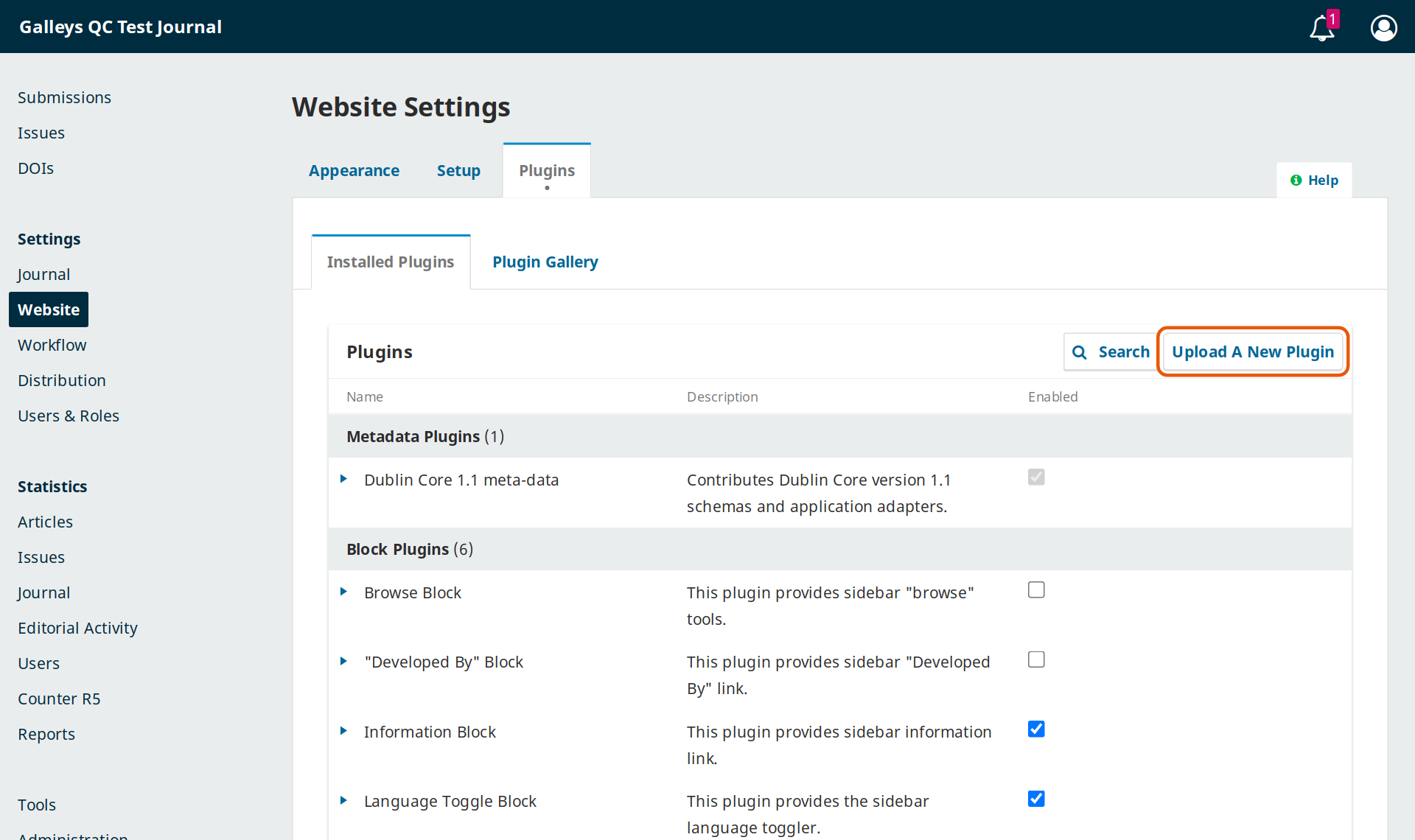
Settings → Website → Plugins → Upload A New Plugin -
3Upload the plugin file
Click Upload File, choose
galleysQc-3.4-3.5-1.1.0.0.tar.gz(do not unzip it), wait for the upload to finish, then click Save.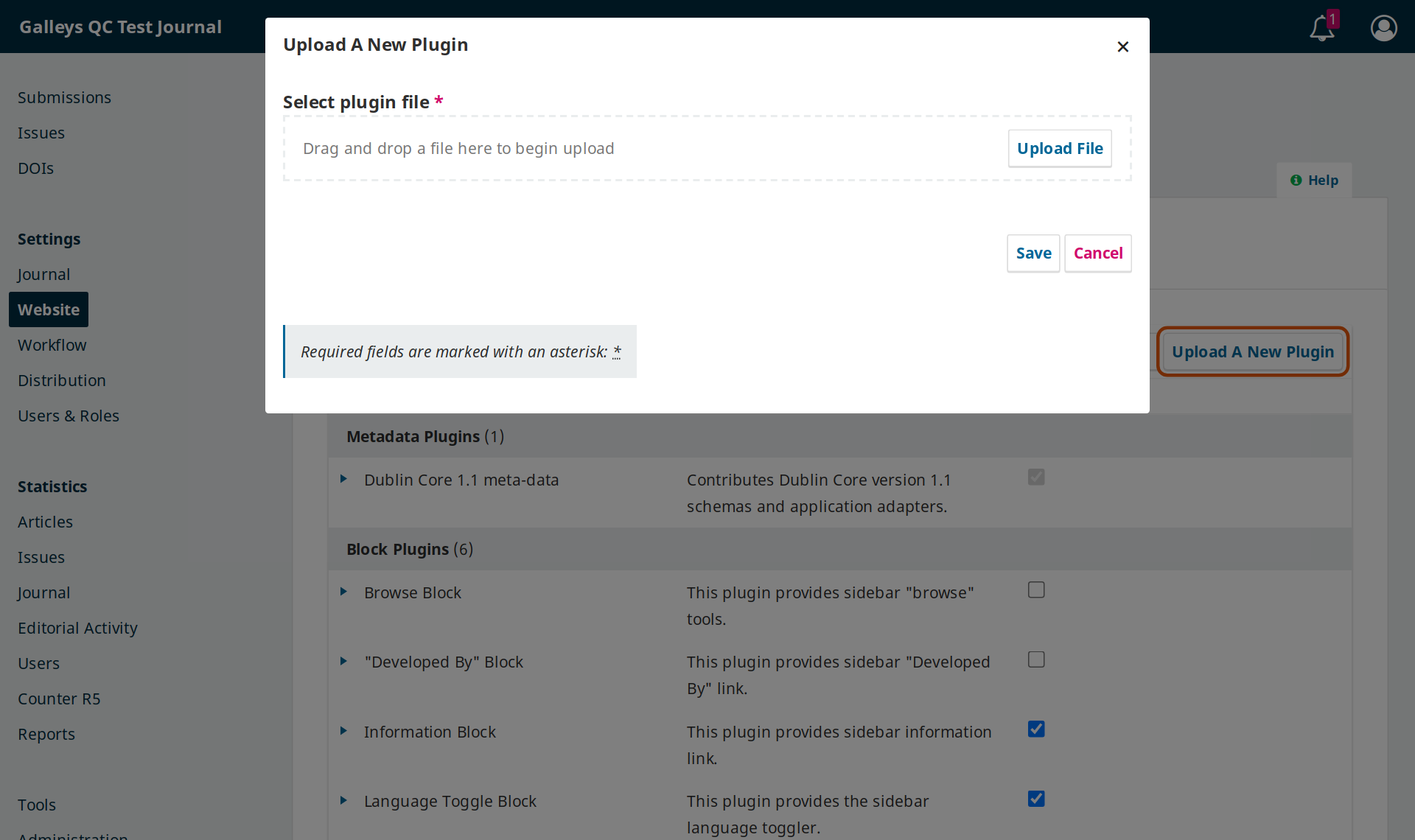
Upload the .tar.gz file exactly as downloaded, then click Save. Upload blocked? Some servers disable plugin uploads. Instead, extract the archive and copy the
galleysQcfolder toplugins/generic/galleysQcon your OJS server. Then reload the Plugins page. -
4Enable “Galleys QC”
Scroll to Generic Plugins, find Galleys QC, and tick the Enabled checkbox. Click the arrow next to the name to show Settings.
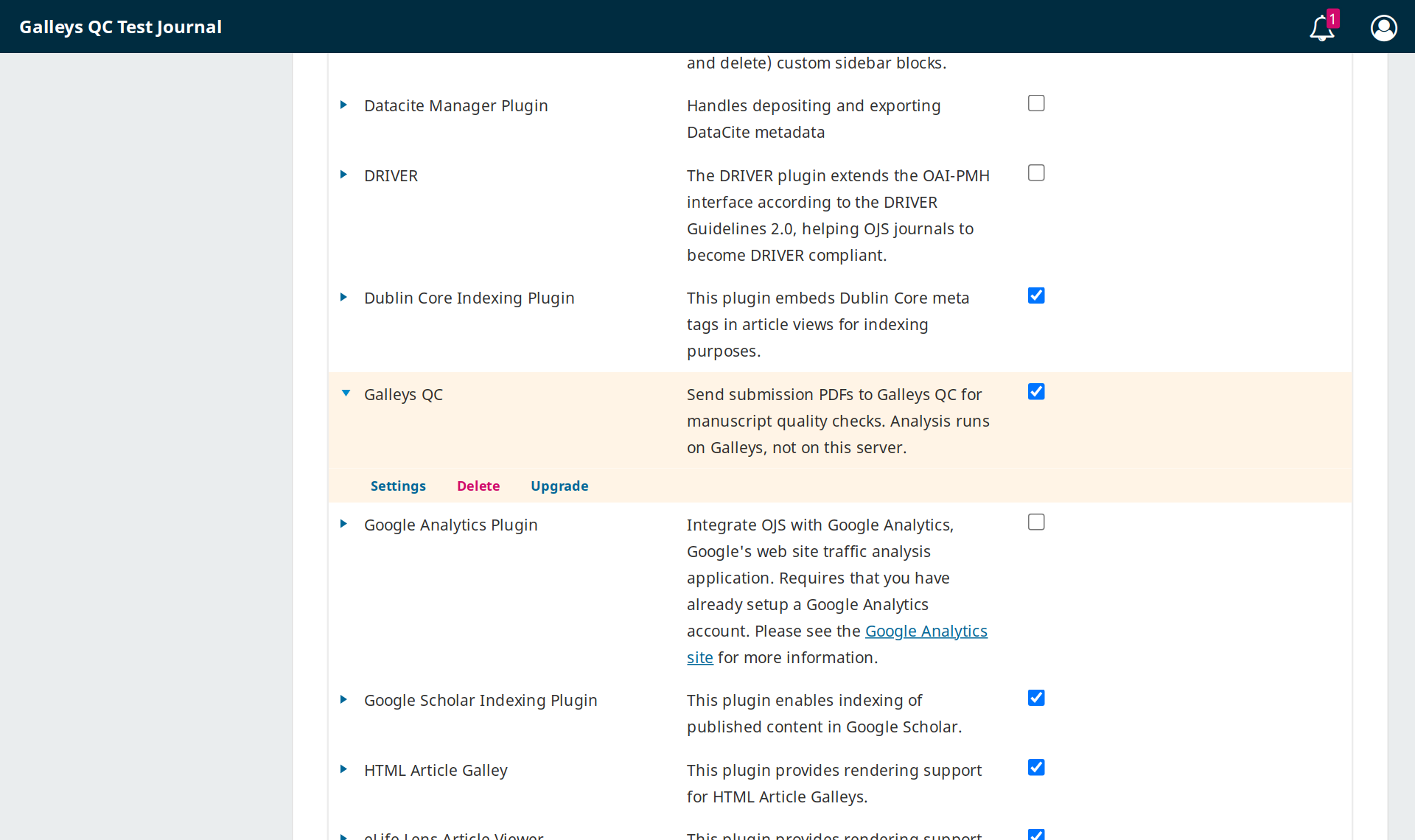
Galleys QC enabled. Expand the row to see Settings. -
5Configure and save
Click Settings and fill in:
Field What to enter Galleys QC API URL (required) https://qc.galleys.pubAPI key (required) Your gq_…key from Step 1Galleys journal UUID (optional) Links this OJS journal to a journal in Galleys for aims & scope matching. Find it in Galleys → Journals. ISSN (optional) Used to match the journal if no UUID is given. Falls back to the OJS ISSN. Click Save.
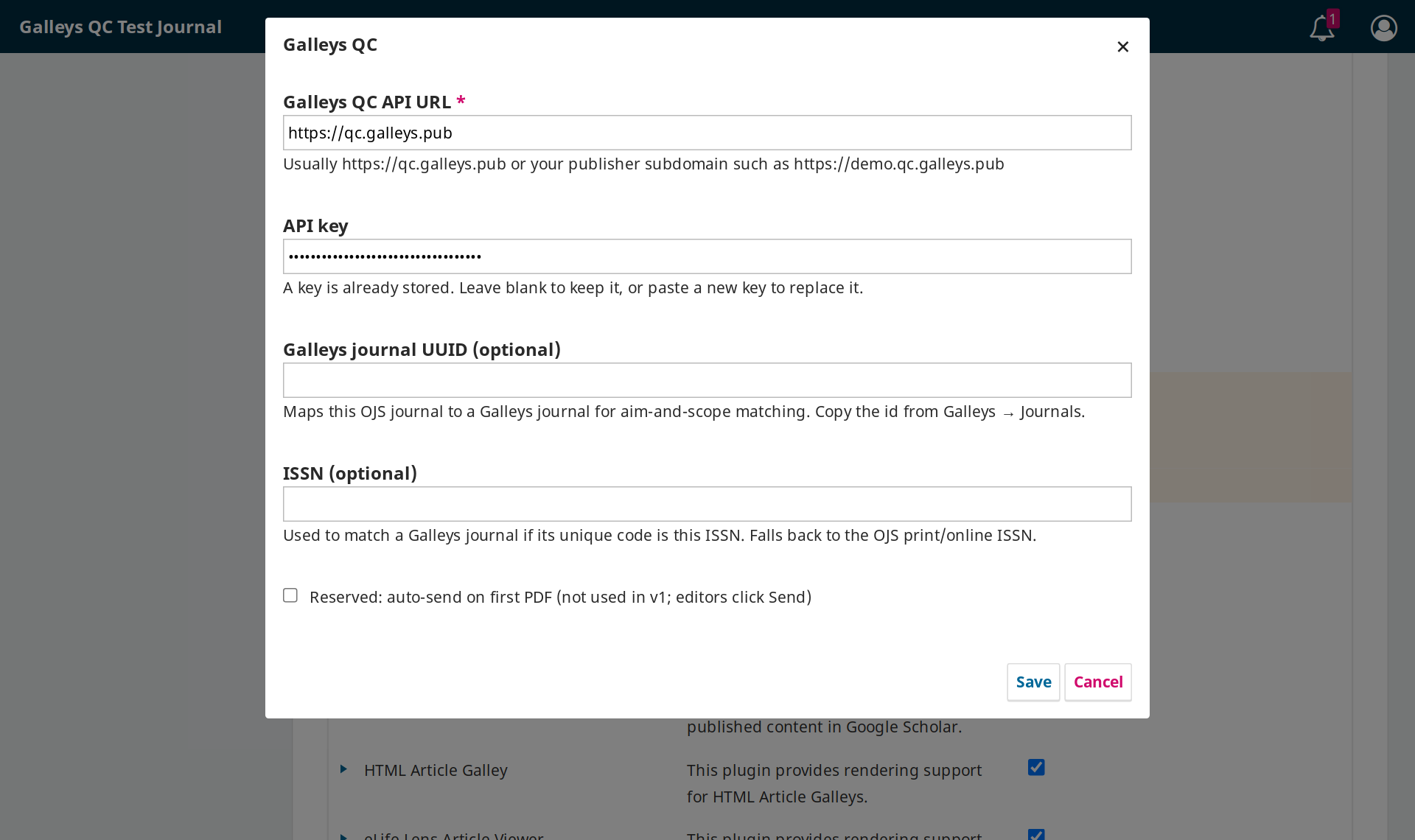
Plugin settings: API URL and API key are all you need to start. -
6Run QC on a submission
- OJS 3.5: open a submission. Below Submission Files you will see the Galleys QC panel. Click Run QC.
- OJS 3.4: open the submission workflow, go to the Galleys QC tab, and click Send to Galleys QC.
The full nine-engine report takes three to five minutes. It appears in OJS and in your Galleys dashboard at qc.galleys.pub, where you can download the PDF.
The Galleys QC panel doesn’t appear on OJS 3.5
Clear the OJS cache: go to Administration → Clear Data Caches and Clear Template Cache, then hard-refresh your browser (Ctrl+Shift+R). You can also open the QC view directly at /index.php/JOURNAL_PATH/galleysQc/view?submissionId=ID.
“Unauthorized” or connection error after saving settings
Check the API key for missing characters or extra spaces, and make sure the API URL is exactly https://qc.galleys.pub. Your hosting firewall must also allow outbound HTTPS to qc.galleys.pub.
Upgrading from an older version
Upload the new package with Upgrade on the Galleys QC row (next to Settings). Your API key and settings are kept.
Need help installing?
Email contact@galleys.pub or WhatsApp +91 70076 04585. We can install and test it for you on a short call.
Common questions
Does this replace peer review?
No. It removes repetitive technical screening so reviewers focus on scholarly merit.
Where do I access the app?
Sign in at qc.galleys.pub. Upload manuscripts, run QC and download reports from the same dashboard.
Does it integrate into OJS?
Yes. An OJS plugin for OJS 3.4 and 3.5 is available on paid plans. QC still runs on Galleys servers, so OJS stays fast. See the installation guide.
How are uploaded manuscripts handled?
See Data & confidentiality for storage, access, retention, deletion, and related questions.
Pricing
Published plans — start with a free trial
QC by Galleys has six self-serve plans, billed monthly or annually (2 months free), on the pricing page. All prices exclude GST; 18% GST will be added. OJS setup, hosting, and custom work remain quoted separately.
Related services
Ready to strengthen your journal for indexing?
Sign in at qc.galleys.pub and start your 14-day free trial, or book a walkthrough and we'll screen a sample from your journal live.